
Adobe Master Collection 2025 Latest Version, Lifetime
LKR 2,500LKR 1,600
 33% Off
Get lifetime access to the world’s leading PDF solution. This listing is for a 100% genuine, authentic activation key for Adobe Acrobat Pro 2020. It delivers full desktop functionality without the hassle of monthly subscription fees.
 Pay LKR 1,090.00 × 3 installments with KOKO
 ✅ Lifetime License: One-time purchase, perpetual use software. ✅ No Subscriptions: Say goodbye to monthly Creative Cloud fees. ✅ Complete PDF Tool: Create, edit, sign, protect, and export PDFs ✅ Instant Delivery: Receive your digital activation code quickly. ✅ Full Compatibility: Works perfectly on Windows desktops.
Get lifetime access to the world’s leading PDF solution. This listing is for a 100% genuine, authentic activation key for Adobe Acrobat Pro 2020. It delivers full desktop functionality without the hassle of monthly subscription fees.
(Acrobat Pro and Standard)
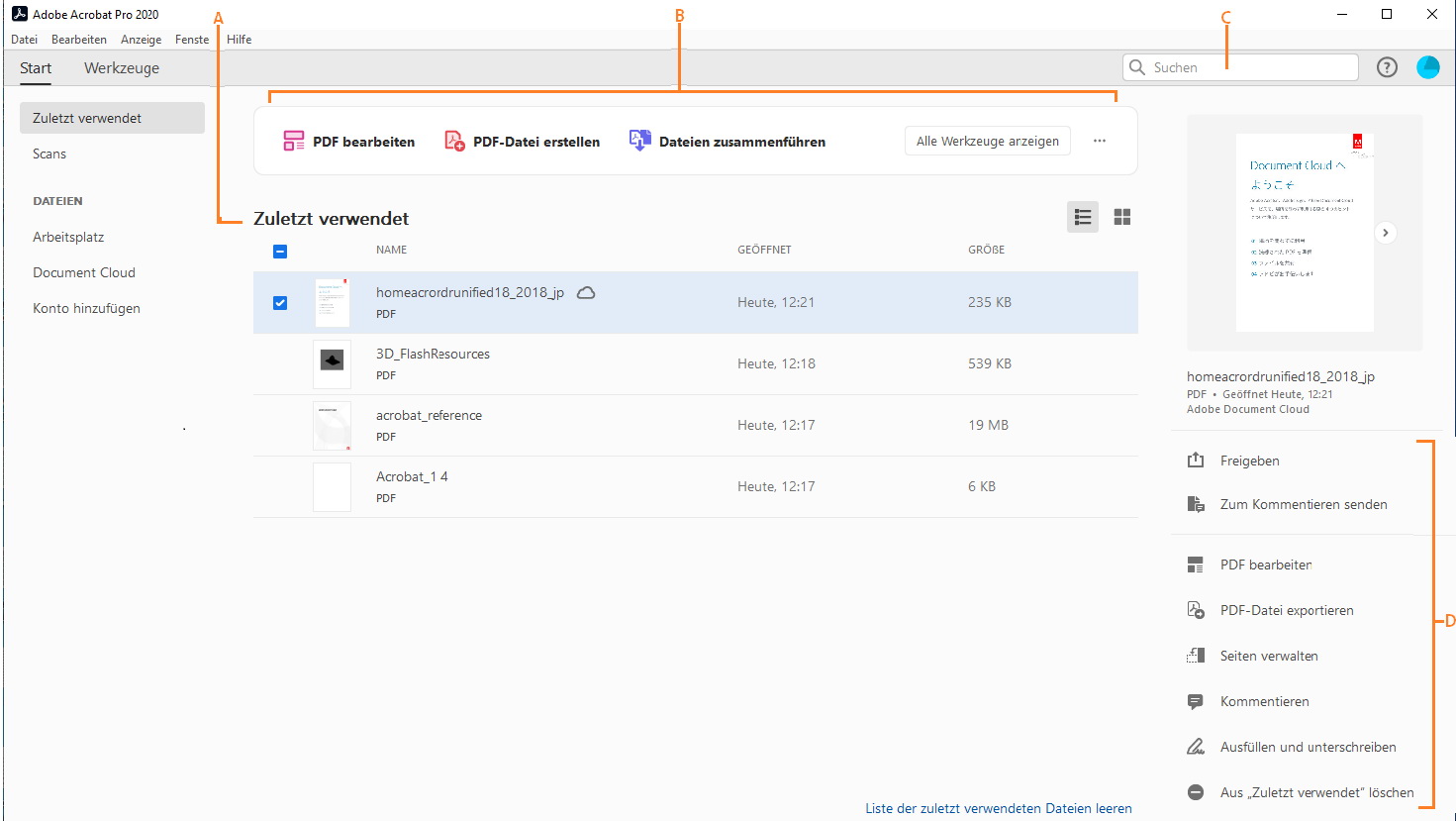
The new Home view helps you stay organized and productive - a central place to organize, manage, and search for all your PDF files.
(Acrobat Pro and Standard)
Now you can use Adobe Acrobat 2020 and Acrobat Reader 2020 Windows and Mac desktop applications to open files protected with Microsoft Information Protection (MIP) solutions, including Azure Information Protection (AIP) and Information Protection with Office 365.
Acrobat 2020 and Acrobat Reader 2020 automatically detect a MIP-protected file and prompt you to download the appropriate plug-in from the Help page. Once you have downloaded and installed the add-on, the protected files will open in Acrobat or Reader just like any other PDF file.
(Acrobat Pro and Standard)
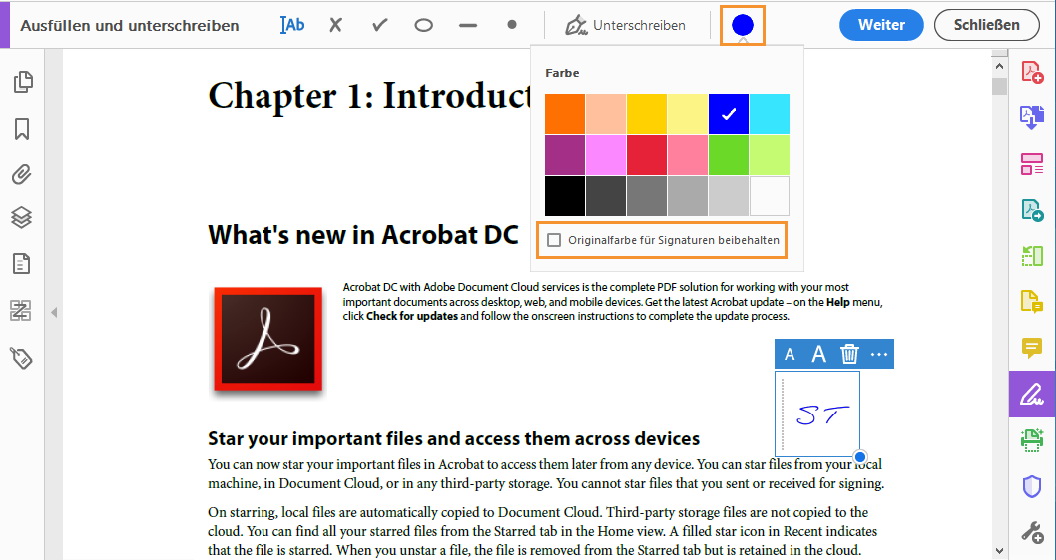
You can now use the "Fill and Sign" tool in Acrobat 2020 to select the color you want to use to fill in the PDF form and then sign it. To change the color, click the Color button in the Fill and Sign toolbar.
Acrobat 2020 can now perform OCR on scanned PDF files that contain images with live text.
(Acrobat Pro feature only)
(Acrobat Pro feature only)
Improved accessibility features in Acrobat 2020 make it easier for people with disabilities to use PDF documents and forms with and without the help of assistive software, technology, and devices.
Improved user experience with DirectInk
(Acrobat Pro and Standard)
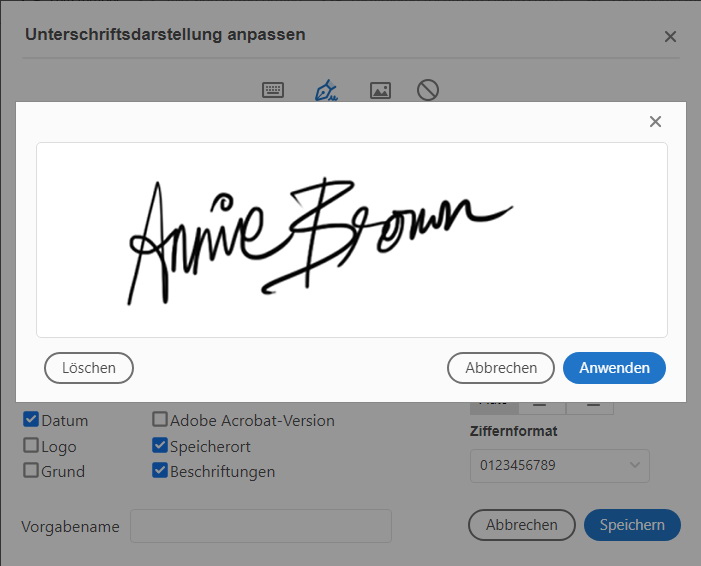
The improved pen tool with DirectInk technology makes it even easier and more accurate to write and draw directly on the document without selecting a tool.
(Acrobat Pro and Standard)
New DirectInk support in the Certificates app signature panel provides a more natural experience and gives you more control over how your signature looks when signing on Windows 10 devices.
System Requirements Windows









 Pay LKR 1,090.00 × 3 installments with KOKO
 ✅ Lifetime License: One-time purchase, perpetual use software. ✅ No Subscriptions: Say goodbye to monthly Creative Cloud fees. ✅ Complete PDF Tool: Create, edit, sign, protect, and export PDFs ✅ Instant Delivery: Receive your digital activation code quickly. ✅ Full Compatibility: Works perfectly on Windows desktops.
Get lifetime access to the world’s leading PDF solution. This listing is for a 100% genuine, authentic activation key for Adobe Acrobat Pro 2020. It delivers full desktop functionality without the hassle of monthly subscription fees.
(Acrobat Pro and Standard)
The new Home view helps you stay organized and productive - a central place to organize, manage, and search for all your PDF files.
(Acrobat Pro and Standard)
Now you can use Adobe Acrobat 2020 and Acrobat Reader 2020 Windows and Mac desktop applications to open files protected with Microsoft Information Protection (MIP) solutions, including Azure Information Protection (AIP) and Information Protection with Office 365.
Acrobat 2020 and Acrobat Reader 2020 automatically detect a MIP-protected file and prompt you to download the appropriate plug-in from the Help page. Once you have downloaded and installed the add-on, the protected files will open in Acrobat or Reader just like any other PDF file.
(Acrobat Pro and Standard)
You can now use the "Fill and Sign" tool in Acrobat 2020 to select the color you want to use to fill in the PDF form and then sign it. To change the color, click the Color button in the Fill and Sign toolbar.
Acrobat 2020 can now perform OCR on scanned PDF files that contain images with live text.
(Acrobat Pro feature only)
(Acrobat Pro feature only)
Improved accessibility features in Acrobat 2020 make it easier for people with disabilities to use PDF documents and forms with and without the help of assistive software, technology, and devices.
Improved user experience with DirectInk
(Acrobat Pro and Standard)
The improved pen tool with DirectInk technology makes it even easier and more accurate to write and draw directly on the document without selecting a tool.
(Acrobat Pro and Standard)
New DirectInk support in the Certificates app signature panel provides a more natural experience and gives you more control over how your signature looks when signing on Windows 10 devices.
System Requirements Windows
Digital Delivery: Sent directly to your registered e-mail address.
Maximum delivery timeframe: 12 hours.
No reviews yet for this product.